
Guides
Build a Phone Empire Research Tree: Points, Time and Tips
How research works in Build a Phone Empire: what each tech card shows, what technologies cost in points and days, and when creators say to save points.
FAQ
How does research work in Build a Phone Empire?
Can you research more than one technology at a time?
How many technologies are in the research tree?
When should you save research points in Build a Phone Empire?
Every number on this page is read from public gameplay videos and tagged Reported , with the channel, the video and the second where we read it. We have not recorded our own session yet. The developer publishes no research data, so there is nothing here we can tag Official apart from the game description and the pass listings.
What does research do in Build a Phone Empire?
Research unlocks parts for your next phone. The developer’s description says you research new tech year by year Official , unlocking tablets, smartwatches, earbuds, foldables and laptops. The Triple Research listing says “Research 3 technologies at the same time instead of 1”, so without it you research one technology at a time Official . Lab Grant is listed as “+20% research points, forever” at R$79, and Triple Research costs R$99. Details are on the game pass page.
In the recordings, research has its own tab in the top bar. It opens a timeline with the in-game years across the top and technologies grouped in rows by area: Network, Software, Ports and Body in a 2007 save, and Camera, Chips, Memory and Battery by 2018 Reported . When nothing is being researched, the left panel says “The lab is idle” and tells you to pick a card.
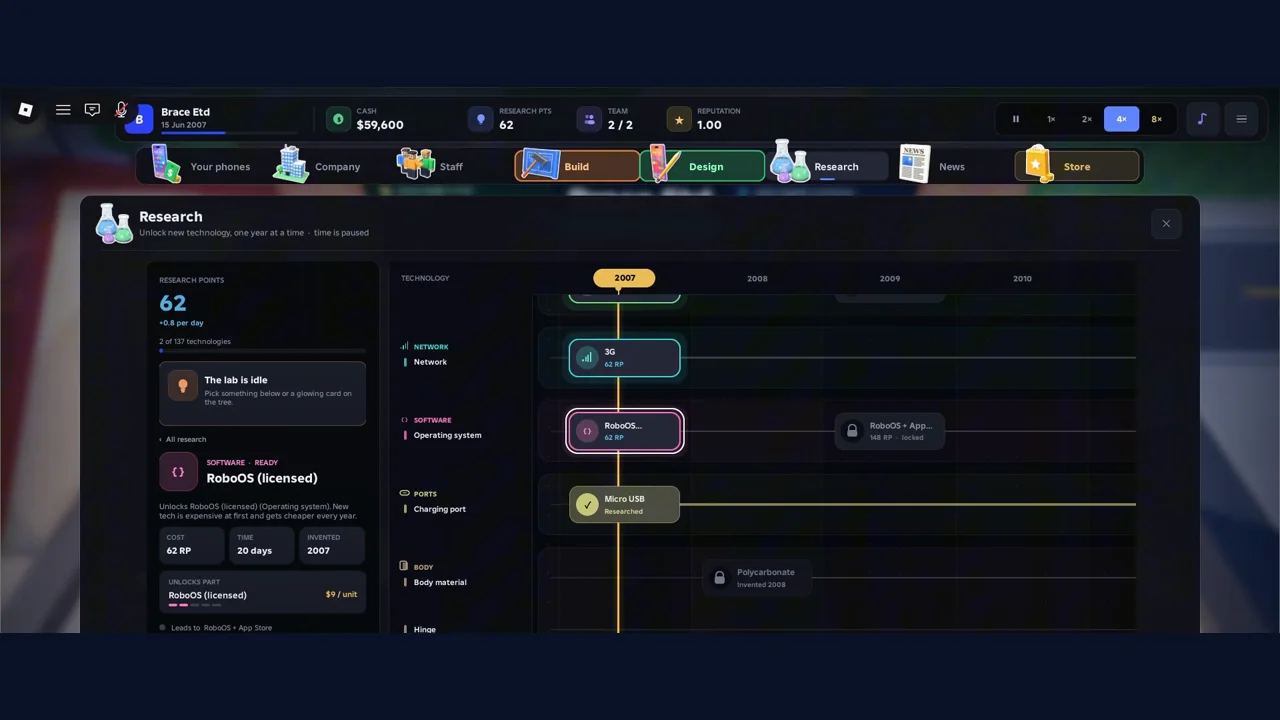
The Research tab in a 2007 save. Source: Ricoko Tutorial & Showcase, 1:40.
What does a research card show?
Click a technology and the left panel shows its card. On the five cards we read, the fields were the same Reported :
| Field | What it shows |
|---|---|
| Cost | Research points (RP) charged to start |
| Time | In-game days the research takes |
| Invented | The in-game year the technology exists. Before that year the button reads “Not invented until 2019” |
| Unlocks part | The Design Studio part it unlocks, with a price per unit |
| Needs / Leads to | The technology before and after it on the branch |
| Button | “Start research” with the RP cost, or “Researched” once done |
Here are the five cards, with the second of the video where each one is on screen.
| Technology | Area | Cost | Time | Invented | Part price | Needs | Read at |
|---|---|---|---|---|---|---|---|
| RoboOS (licensed) | Software | 62 RP | 20 days | 2007 | $9 per unit | Not shown | Ricoko 1:40 |
| Gradient Glass | Design | 355 RP | 22 days | 2018 | Not shown | All-Screen Notch | w1ndbreaker 1:02 |
| Depth sensor lens | Camera | 474 RP | 22 days | 2017 | Not shown | Telephoto 2x lens | w1ndbreaker 0:58 |
| 4K | Screen | 1,164 RP | 37 days | 2018 | $130 per unit | 1440p | w1ndbreaker 0:30 |
| 24 MP selfie camera | Camera | 878 RP | 30 days | 2019 | $32 per unit | 12 MP | w1ndbreaker 0:56 |
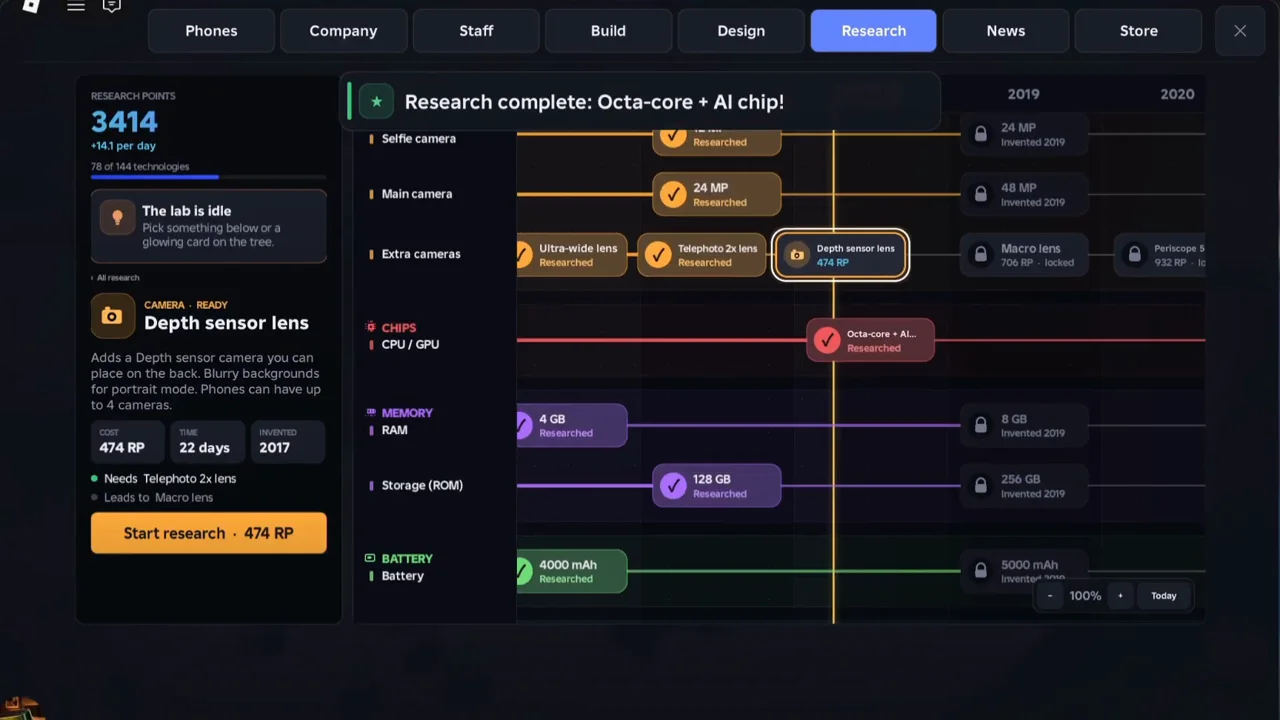
A 2018 save with 3,414 research points and 78 of 144 technologies researched. Source: w1ndbreaker, 0:58.
Five cards from two saves are not a cost formula. We cannot tell whether cost and time follow the year, the area, or something else Unknown . Three of the cards carry the line “New tech is expensive at first and gets cheaper every year”, printed next to the part price. The card does not say whether that means the research cost, the part price, or both Unknown .
How are research points earned and spent?
| Save | Research points | Rate shown | Technologies researched | Source |
|---|---|---|---|---|
| 2007 | 62 | +0.8 per day | 2 of 137 | Ricoko 1:40 |
| 2018 | 3,414 | +14.1 per day | 78 of 144 | w1ndbreaker 1:02 |
Starting Gradient Glass, which costs 355 RP, took the counter from 3,414 to 3,059 within four seconds. So the full cost looks to be charged when you press start, not when the research ends Reported . The card then switched to a disabled “Researching” button, and the left HUD showed “Researching now” with 22 days left.
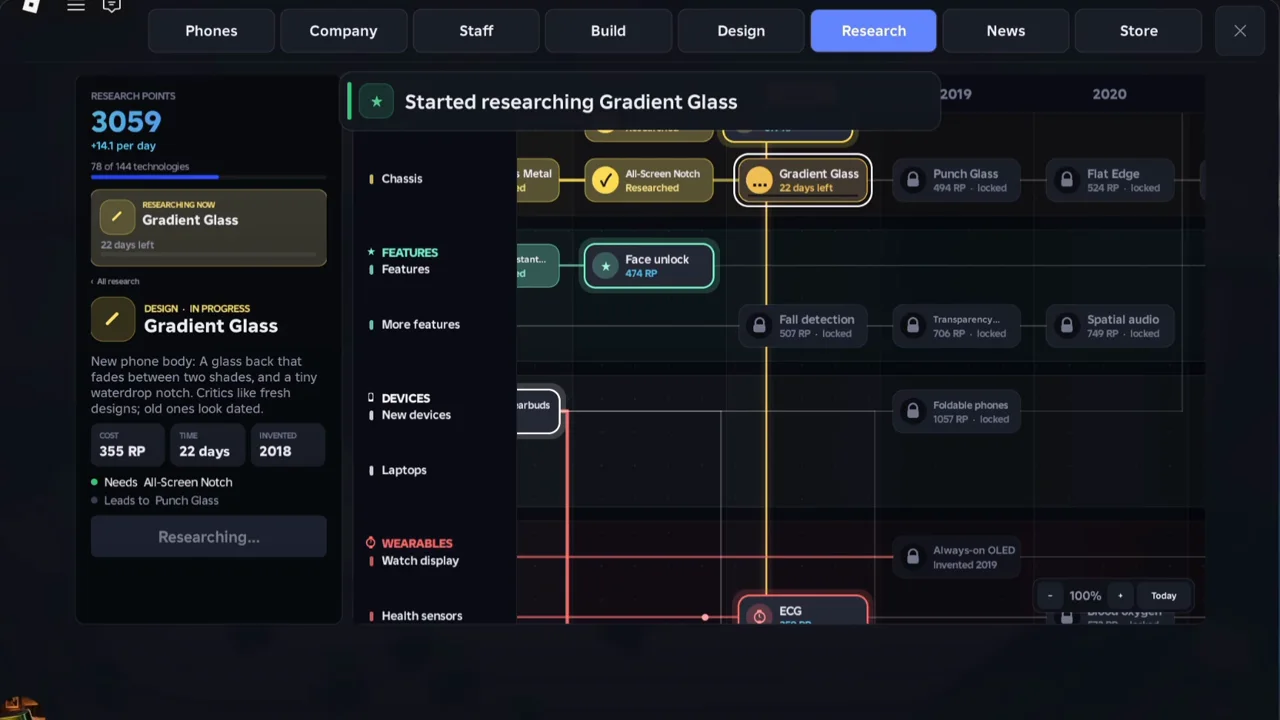
Right after pressing Start research on Gradient Glass. Source: w1ndbreaker, 1:06.
While a technology runs, the HUD shows a progress bar and days left. At 0:12 of the same video it reads “Researching 4K, 3%” with “36 days left”. When it finishes, a message appears and the HUD notes that new parts are unlocked for your next design.
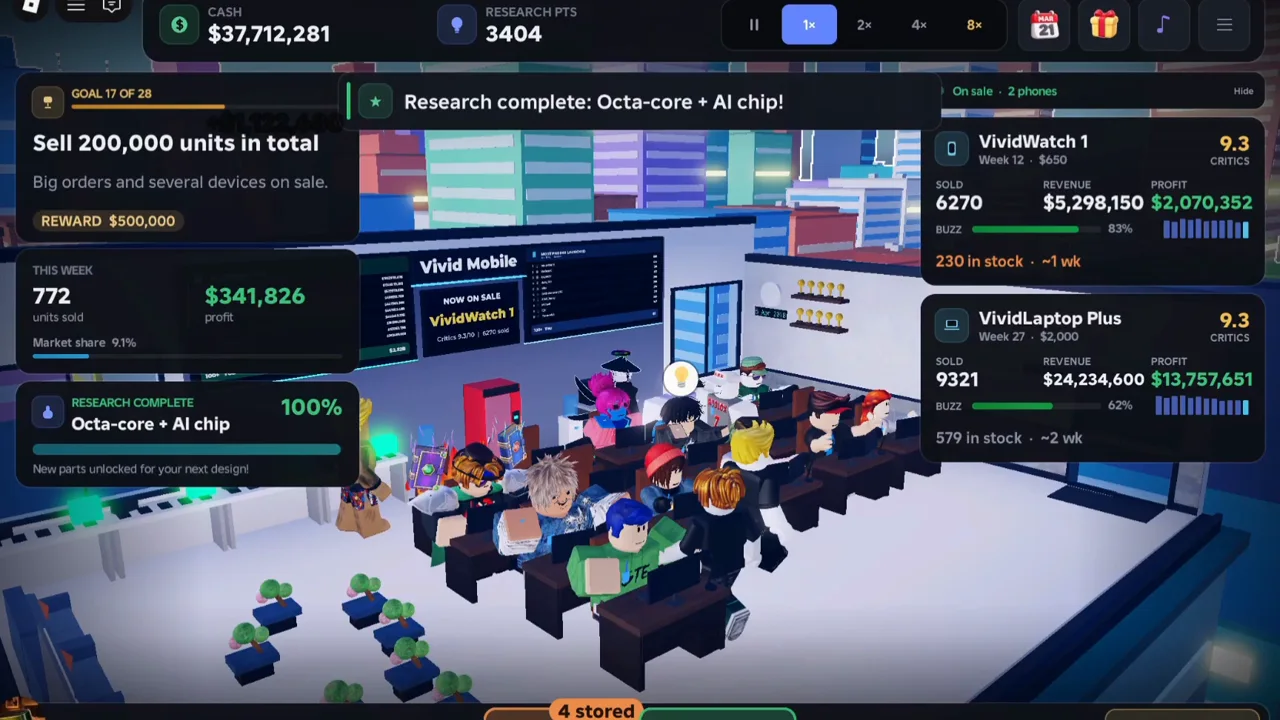
The HUD after “Research complete: Octa-core + AI chip!”. Source: w1ndbreaker, 0:54.
What raises the daily rate from +0.8 to +14.1 is not shown in these clips Unknown . The only rate change we can source is the Lab Grant listing: “+20% research points, forever” Official .
How do research and the Design Studio connect?
The Design Studio marks options that are not available yet, and the label differs Reported :
| Label in the Design Studio | Examples we saw | Our reading |
|---|---|---|
| Needs research | 256 MB RAM, 60 Hz refresh rate | A technology in the tree that you can research now |
| Arrives 2008 | 1 GHz CPU, 5 MP back camera, 8 GB storage, Polycarbonate body | Not invented until that in-game year |
The first column is read from the game. The last column is our own reading, which matches the research card text “Not invented until 2019” but is not confirmed. The Features step says “Turn on what you’ve researched”, and a GPS toggle at $4 per unit appears there, so a researched technology becomes a switch you can flip in the studio.
When should you save research points?
One creator gives a timing tip in a 70-second video Reported . His third tip is about research points: save them from mid August to early September, and if you cannot wait, skip through the month at 4x or 8x speed. He does not say why.

w1ndbreaker: tips video, research tip starts at 0:55
Our reading, not tested: the cards say a technology cannot be researched before its “Invented” year, so saving points before a new year’s technologies appear would let you start them straight away. That fits the tip, but nothing on screen confirms it Unknown . The Hyper Speed pass listing says it “Adds an 8× speed button (or press 5)” Official , at R$49. The recordings show speed buttons on screen, and we cannot tell whether the creator owns that pass or whether 8× is locked without it Unknown .
A second creator tells new players to save research points early to buy GPS, Micro USB and RoboOS (licensed) before the first phone. His 2007 Research tab shows Micro USB as “Researched” and RoboOS (licensed) ready at 62 RP.
Which technology should you research first?
We have no tested order, and the developer does not publish one. Here is a method built only from what the screens show:
- Open the Design Studio and note which options say “Needs research”. Those are what your next phone is missing.
- Open the matching card and read Cost, Time and Needs before you start.
- Check how many research points you have against the cost. The full cost is charged on start.
- If the card says “Not invented until” a year, no amount of points will start it, so pick another card.
For what to do with the phone once it is designed, see the launch and money guide. New to the game? Start with the beginner overview.
What do we still not know about research?
- How research points are earned and what raises the daily rate. Unknown
- The cost and time formula, and whether costs fall with the in-game year. Unknown
- The real total number of technologies, and whether 137 and 144 are two builds. Unknown
- The best first research order for each run. Unknown
- Which technologies the Admin Abuse event adds, since its listing mentions “new research options beyond 2026”. Unknown
Where did these numbers come from?
- Tips that can make you a better player at Build a phone empire! by w1ndbreaker, uploaded 2026-10-08. We used the research cards and counters from a 2018 save.
- Build a Phone Empire Roblox Best Way to Get Money Fast for Beginners by Ricoko Tutorial & Showcase, uploaded 2026-10-06. We used the 2007 research tab.
The text and tables are our own writing. The screenshots are single frames from these videos, kept so you can see where each number appears. Watch the originals for the full context.
Related Articles
guides
How to Design a Phone in Build a Phone Empire: All 13 Steps
All 13 Build a Phone Empire Design Studio steps, what each option costs per unit in a 2007 recording, and which choices the game says affect reviews.
guides
How to Make Money in Build a Phone Empire: Launch Numbers
Where money goes and comes from in Build a Phone Empire: factory setup, ad tiers, goal rewards and one creator's first-phone run, from launch to profit.
codes
Build a Phone Empire Codes (October 2026): Verified Status
Are there working Build a Phone Empire codes? As of 2026-10-08 none are verified. See how we check codes and how to avoid fake lists and scams.
Was this helpful?
Thanks for the feedback!