
Guides
How to Design a Phone in Build a Phone Empire: All 13 Steps
All 13 Build a Phone Empire Design Studio steps, what each option costs per unit in a 2007 recording, and which choices the game says affect reviews.
FAQ
How many steps does the Build a Phone Empire Design Studio have?
Does screen size change your critic score?
Can you design a tablet or smartwatch at the start?
What does a first phone cost to make?
Everything below is read from one public 2007 gameplay recording and tagged Reported , with the second of the video where each screen appears. The developer publishes no Design Studio data. The only Official facts here are the game description and the pass listings.
How do you open the Design Studio, and what can you design?
The developer’s description says you design every device yourself: “screen size, cameras, corners, buttons, colour, finish and logo”, then “pick the parts, set the price and hand it to your team” Official . In the recording, the Design tab in the bottom bar opens the studio, and the first goal on screen says “Start making your first phone” Reported .
The studio header reads “Design Studio”, the year, the company name and “time is paused”, so the game clock stops while you design. The top bar has Undo, Redo, Concept shelf and Back to office. A side panel switches the view between Auto, Spin, Front, Back, Side and Bottom.
What are the 13 Design Studio steps?
The panel on the right shows “Step N of 13”. Here is what each step offered in the 2007 save, and what the creator picked. Prices are the per-unit amounts printed next to each option Reported .
| Step | Name | What the panel offered | Creator’s pick |
|---|---|---|---|
| 1 | Device | Phone (“The classic. Biggest market.”). Tablet, Smartwatch, Earbuds and Foldable show “Not invented until” 2010, 2014, 2016 and 2019 | Phone |
| 2 | Chassis | Chrome Slab (2007, brand new), Gloss Curve (arrives 2008), Soft Touch (arrives 2009). Unit cost $4 | Chrome Slab |
| 3 | Screen size | Width and height sliders and Compact, Balanced, Big presets. Size is shown in inches | 6.1 in |
| 4 | Screen type | Resolution 240p, 320p ($19), 480p (arrives 2009). Refresh rate 30 Hz ($3), 60 Hz (needs research). Technology TN LCD ($5) | 320p, 30 Hz, TN LCD |
| 5 | Selfie camera | None ($0) or 0.3 MP (+$1) | None |
| 6 | Back cameras | Lens 1.3 MP, 2 MP ($6) or 5 MP (arrives 2008). Position and camera bump (None, Circle, Square, Pill, Bar) | 2 MP, Circle bump |
| 7 | Corners and bezels | Corner rounding slider, screen border slider with a 0.30 in minimum | Round corners, 0.30 in border |
| 8 | Side buttons | Left or Right side, height on the side | Right, High |
| 9 | Charging port | “Slide the port along the bottom edge” | Not shown on screen long enough to read |
| 10 | Specs | CPU 400 MHz ($7), RAM 128 MB ($2), storage 4 GB ($6), battery 1000 mAh ($2) | Those four |
| 11 | Features | GPS toggle, $4 per unit | GPS on |
| 12 | Colour and branding | Body colour, surface finish, body material (Plastic $4), back logo, wallpaper | A lilac body, Plastic |
| 13 | Final review | Cost, factory setup, cash, price field, Begin development | Price $230 |
Steps 1 and 2 on screen:
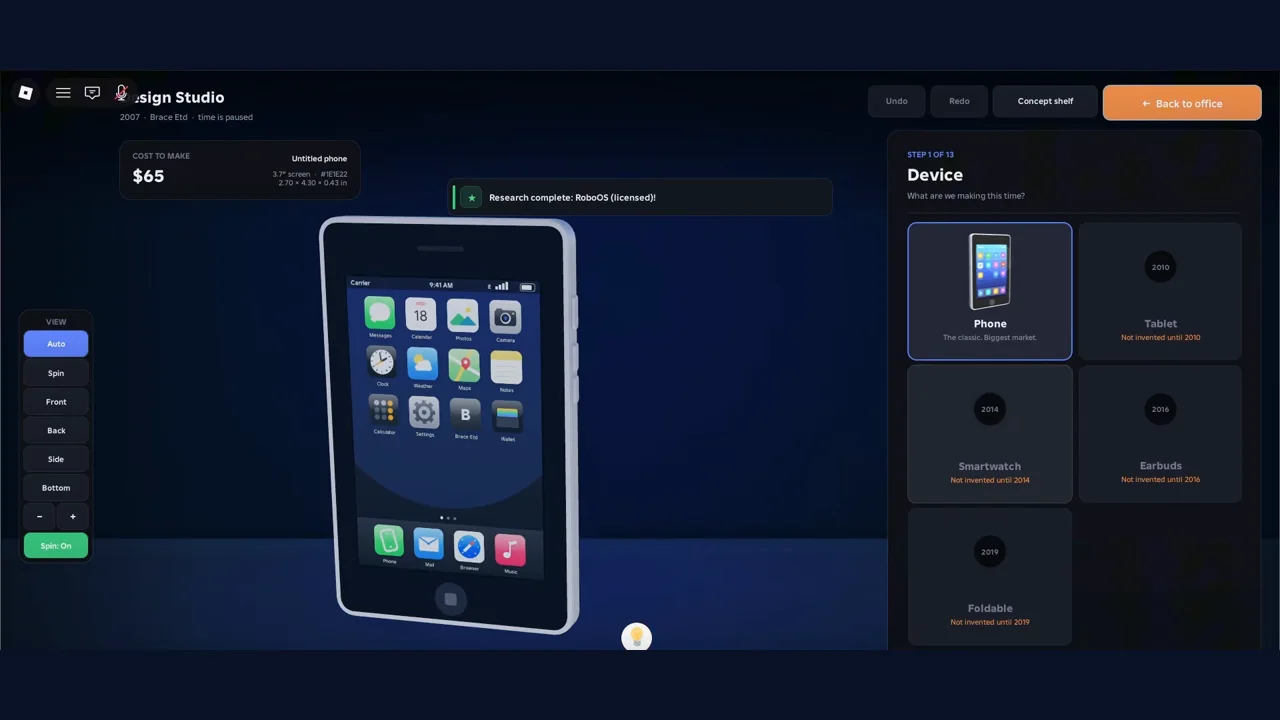
Step 1, Device, in a 2007 save. Source: Ricoko Tutorial & Showcase, 1:50.
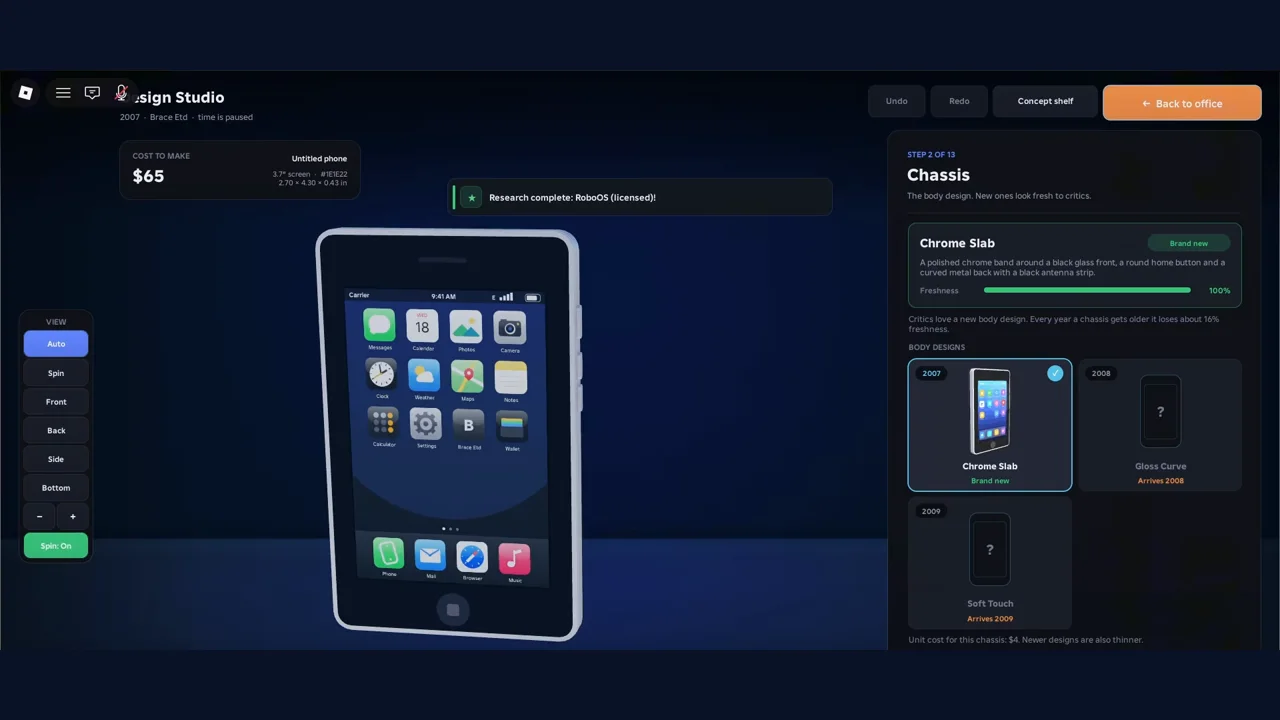
Step 2, Chassis. The panel says a chassis loses about 16% freshness every year it ages. Source: Ricoko, 1:52.
What does each part cost, and which ones need research?
Some options carry a label instead of a price. Two kinds showed up Reported :
- Arrives 2008 or 2009. The option exists but not yet in the game’s calendar: 480p screens, the 1 GHz CPU, 5 MP back camera, 8 GB storage and the Polycarbonate body.
- Needs research. The 256 MB RAM and the 60 Hz refresh rate. Our reading, not confirmed: these are technologies you can buy in the research tree today.
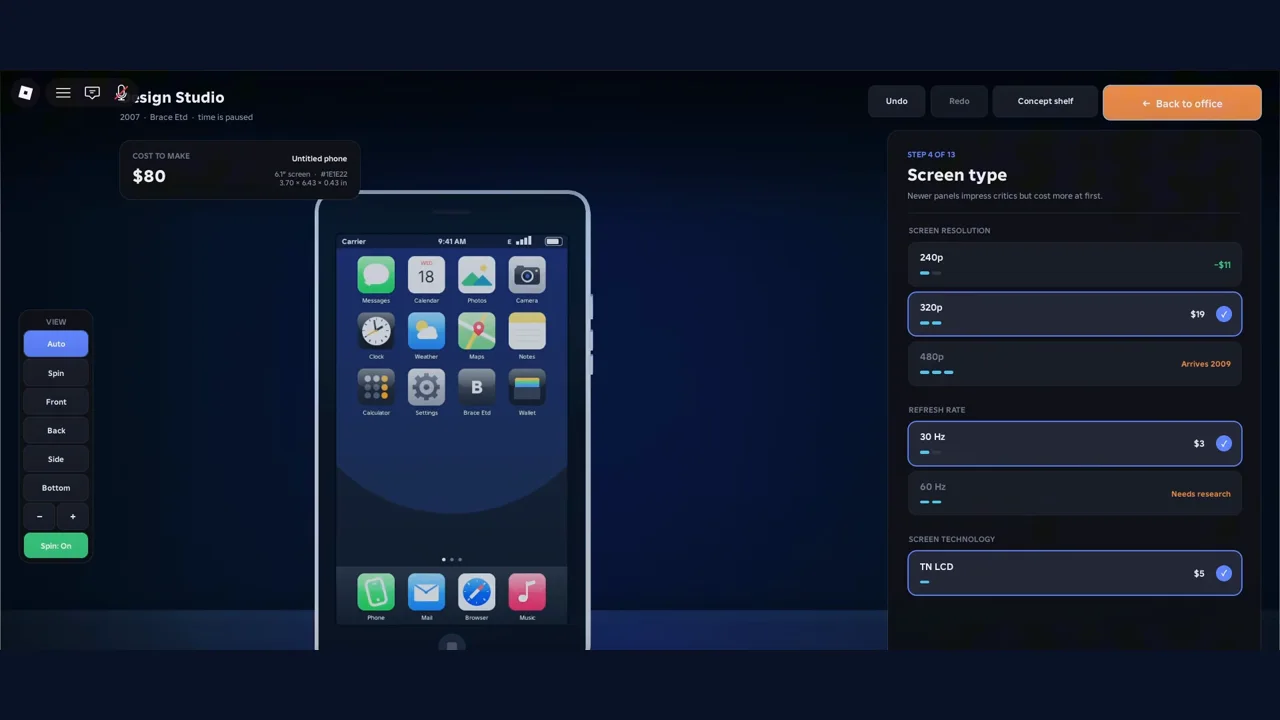
Step 4, Screen type. Newer panels impress critics but cost more at first, the panel says. Source: Ricoko, 1:58.
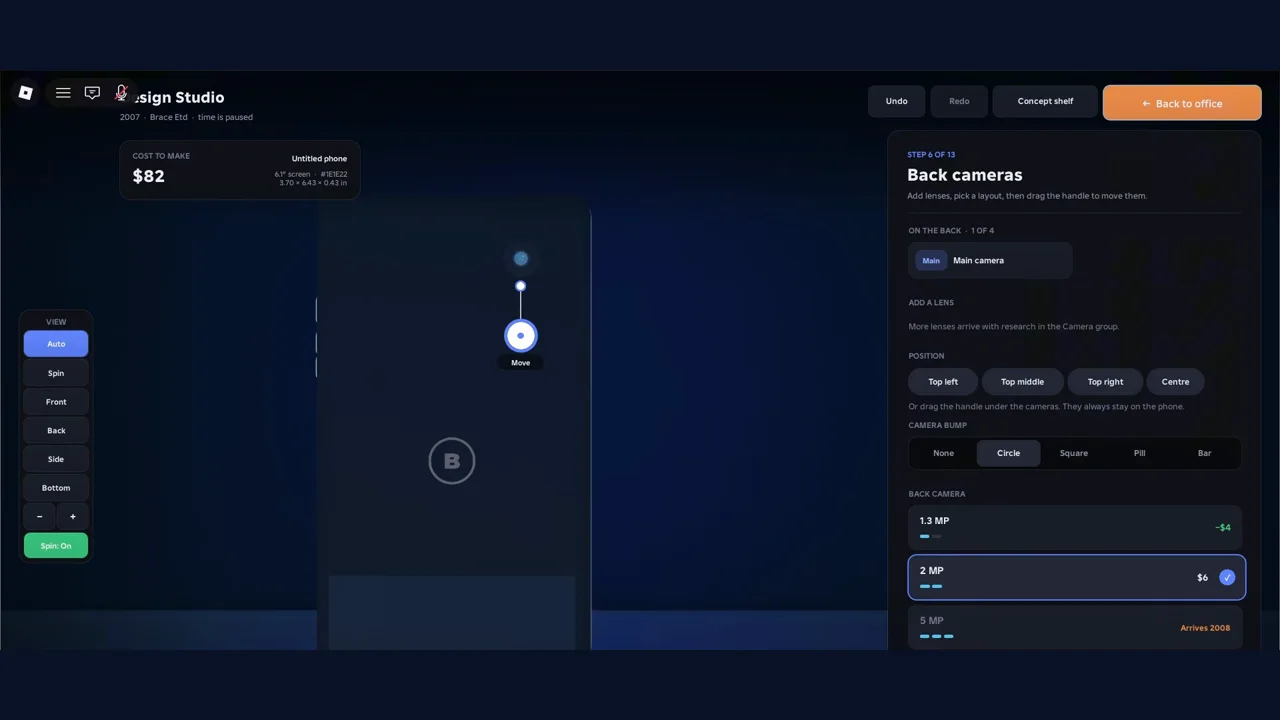
Step 6, Back cameras. More lenses arrive with research in the Camera group. Source: Ricoko, 2:05.
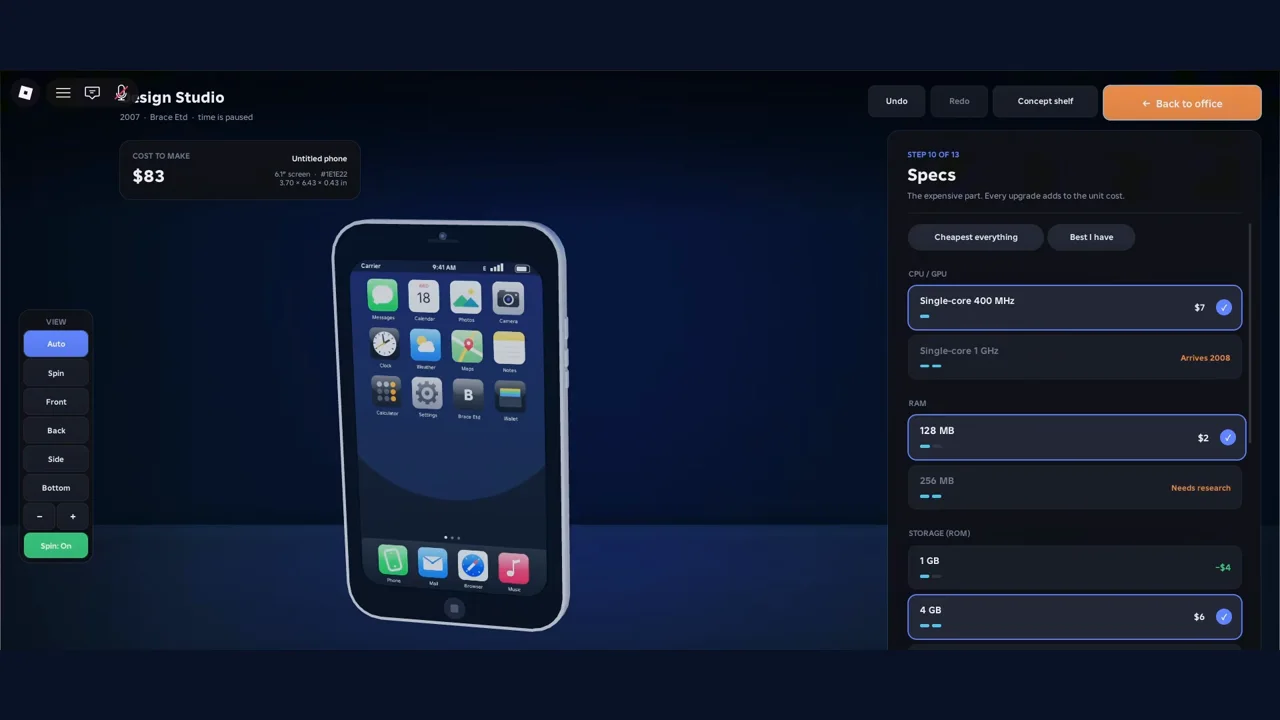
Step 10, Specs: “The expensive part. Every upgrade adds to the unit cost.” Source: Ricoko, 2:30.
The Specs step has two preset buttons, “Cheapest everything” and “Best I have”. The creator did not use the cheapest storage: 1 GB showed as $4 cheaper than the 4 GB he chose.
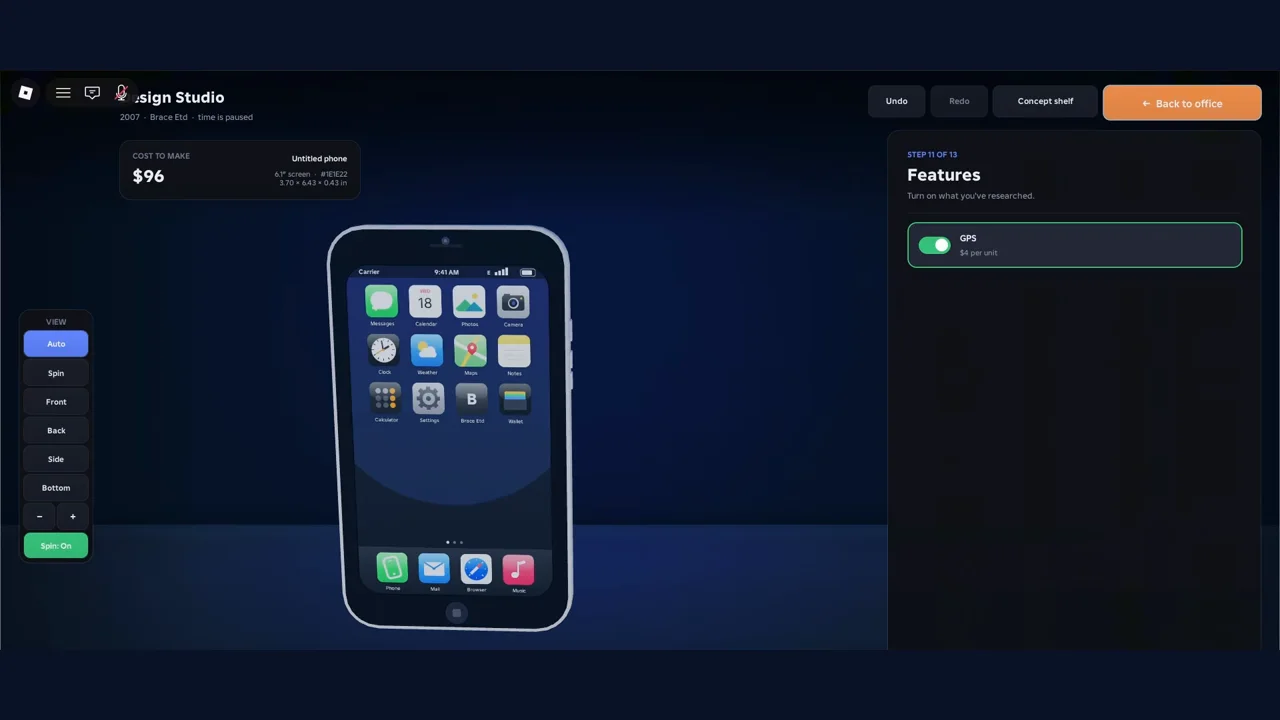
Step 11, Features: “Turn on what you’ve researched.” Source: Ricoko, 2:38.
How did the cost to make one phone change?
The “Cost to make” badge in the top left follows your picks, and it also prints the screen size in inches. These are the values we could read:
| Moment | Badge | Source |
|---|---|---|
| Step 1, Device | $65 | 1:50 |
| Step 3, Screen size, mid-drag at 5.4 in | $77 | 1:55 |
| Step 4, Screen type, with the 6.1 in screen | $80 | 1:58 |
| Step 6, Back cameras | $82 | 2:05 |
| Step 10, Specs, before changes | $83 | 2:30 |
| Step 10, Specs, after changes | $92 | 2:35 |
| Step 12, Colour and branding | $96 | 2:45 |
The jump from $92 to $96 matches the GPS toggle at $4 per unit. The per-option prices do not add up to the badge in a simple sum, because the studio starts from default picks. What those defaults are is Unknown .
Which choices does the game say affect reviews?
The studio prints short hints on several steps Reported . Read together, they separate what critics care about from what is only looks:
| Step | In-game wording | Meaning |
|---|---|---|
| Chassis | “Critics love a new body design. Every year a chassis gets older it loses about 16% freshness.” | Body age matters |
| Screen size | “Any size can succeed. Bigger screens cost more to make, but do not lower reviews.” | Size does not hurt reviews |
| Screen type | “Newer panels impress critics but cost more at first.” | Panel tech matters |
| Corners and bezels | “Pick the look you like; border size does not change reviews.” | Border is cosmetic |
| Side buttons | “Its position does not affect reviews.” | Button position is cosmetic |
| Final review | “The critics’ score stays a surprise until launch day.” | You do not see the score in advance |
How much each factor is worth in points is Unknown . The studio does not show it before launch.
What did the finished phone look like on the Final review step?
Step 13 asks you to set a price and “hand it to your team”. The panel showed three numbers Reported : To make one $96, Factory setup $30,000 and Your cash $56,700. It also says “Building it costs about $240 a day in prototypes and testing (brand-new parts cost extra). After that you order your first batch of phones.”
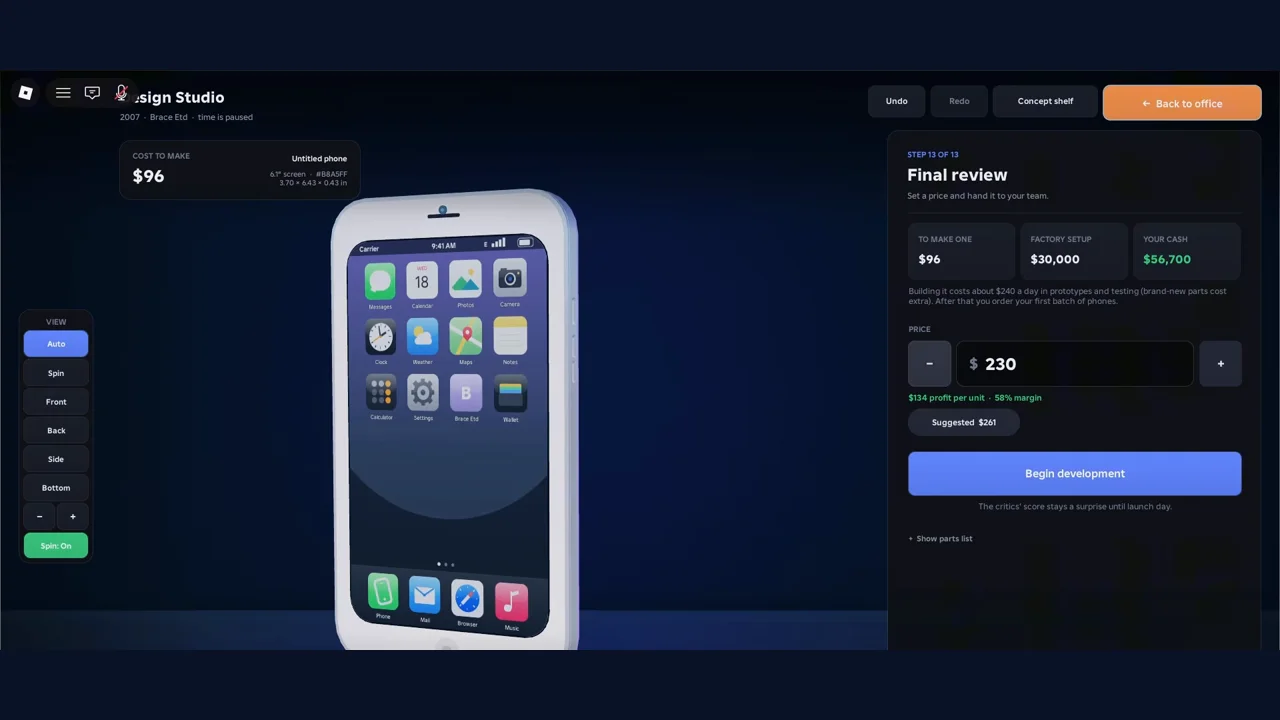
Step 13, Final review. Price $230, “$134 profit per unit, 58% margin”, suggested price $261. Source: Ricoko, 2:55.
The creator set $230 against a suggested $261. The launch panel in the same video later shows $220, and the video does not show where the price changed. How the suggested price is calculated is Unknown . For what happened after the phone launched, with the price, ad tiers and profit, read the money and launch guide.
Ricoko Tutorial & Showcase: the full 2007 first-phone run, design steps from 1:40
Does the Premium Finishes pass change the design?
In the colour step, the studio says “Every body colour is free” and that surface finishes are included with Premium Finishes Reported . The listing for that pass says “6 exclusive colours (Matte Black, Rose Gold, Midnight Green, Sunset Fade, Carbon, Pearl)” at R$35 Official . The two descriptions do not use the same words, and which surfaces the pass unlocks is Unknown . See the game pass guide for every listing.
What do we still not know about the Design Studio?
- What the Charging port step offers, and what the default parts are. Unknown
- How many critic points each part is worth. Unknown
- What the later years add: tablets, smartwatches, earbuds, foldables and laptops each need their own research. Unknown
- How the suggested price is worked out. Unknown
- What the Extra Design Slot pass changes in the studio; its listing says “Build two devices at the same time”. Unknown
New to the game? Start with the beginner overview.
Where did these numbers come from?
- Build a Phone Empire Roblox Best Way to Get Money Fast for Beginners by Ricoko Tutorial & Showcase, uploaded 2026-10-06.
The tables and text are our own writing. The screenshots are single frames from that video, cropped to remove its on-screen captions, so you can see where each number appears. Watch the original for the full context.
Related Articles
guides
How to Make Money in Build a Phone Empire: Launch Numbers
Where money goes and comes from in Build a Phone Empire: factory setup, ad tiers, goal rewards and one creator's first-phone run, from launch to profit.
guides
Build a Phone Empire Research Tree: Points, Time and Tips
How research works in Build a Phone Empire: what each tech card shows, what technologies cost in points and days, and when creators say to save points.
codes
Build a Phone Empire Codes (October 2026): Verified Status
Are there working Build a Phone Empire codes? As of 2026-10-08 none are verified. See how we check codes and how to avoid fake lists and scams.
Was this helpful?
Thanks for the feedback!